
This is not a tutorial nor am I an expert in anything here. I am learning and documenting as I learn. Things here may be wrong, feel free to point them out and reach out to me :)
Introduction
Previously I started a Nakama authoritative multiplayer article in which I was going to show my process for setting up a simple authoritative multiplayer scene, unfortunately, I ran into quite a few roadblocks and hurdles and lost the scope of what I was doing. So I will retire that article and it will no longer be publicly available as I will cover the same material here and do so in a more concise and articulated manner. So to set the scope for this project:
- Ability to create or fetch a Nakama account
- In this project, I will be using the Cardano wallet auth system mentioned in a previous article.
- Create or join an existing match
- button to create a match and auto-join.
- button to join an existing match.
- view other players in the current match
- see other players’ positions, rotation, and current playing animation.
Login Screen
Since there’s already a ton of documentation on Playcanvas and very similar to other game engine editors I will simply go over the basic scene setup and you can extrapolate from there. So this login screen will accept a username and send a Cardano wallet address to an external trusted authentication system. Once the wallet auth system receives this data, it will either return an existing account associated with that wallet address or create a new one and used the provided username for that account.
First I created a 2D screen entity and attached to button and other entities to it. One button will be our connect button which will take our user’s username and a second entity that will accept user input.
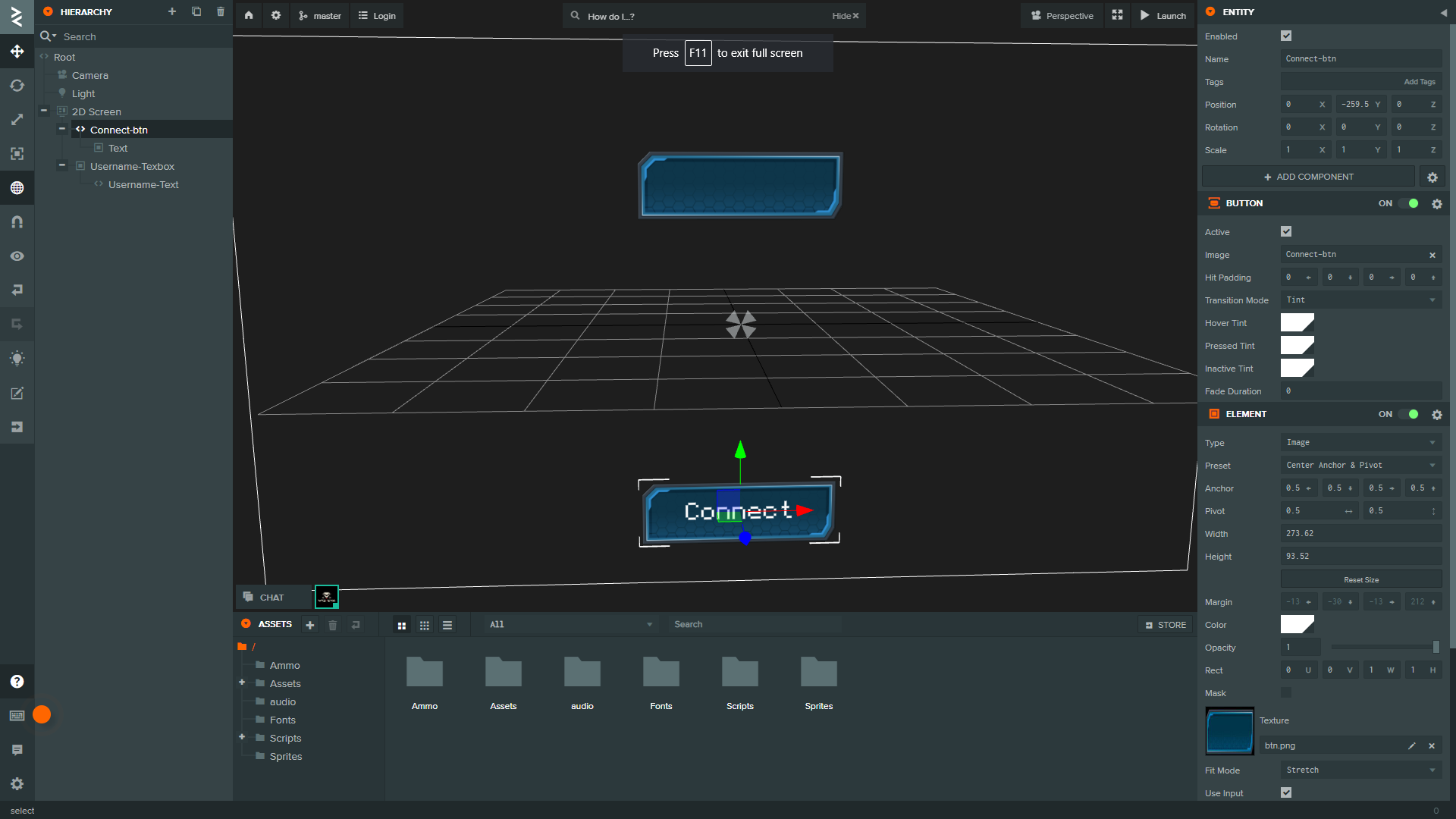
The connect button should have a script to take the user’s desired username and send the request to our wallet auth API. I have provided the script below for such functionality.
1
2
3
4
5
6
7
8
9
10
11
12
13
14
15
16
17
18
19
20
21
22
23
24
25
26
27
28
29
30
31
32
33
34
35
36
37
38
39
40
41
42
43
44
45
46
47
48
49
50
51
52
53
54
55
56
57
58
59
60
61
62
63
64
65
66
67
68
var WalletAuth = pc.createScript('walletAuth');

// This is the entity that will contain the user's input...
WalletAuth.attributes.add('usernameBox', {
    type: 'entity',
    description: 'Username input-box'
});


WalletAuth.prototype.getAddr = async function() {
    let addr = await window.getWalletAddress(window.enableWallet((window.returnWallets()[0])));
    return addr;
};


// initialize code called once per entity
WalletAuth.prototype.initialize = function() {
    this.entity.button.on('click', async function() {
        await callAPI(window.username);
    });
};

// update code called every frame
WalletAuth.prototype.update = function(dt) {
    window.username = this.usernameBox.script.input.getValue();
};


async function callAPI(username) {
    let wallets = window.returnWallets();
    // Use the first wallet if more then 1 are present...
    // There's probably a less ugly way for writing this block of code but for now this works...
    let wallet = window.enableWallet(wallets[0]);
    let addr = await window.getWalletAddress(wallet);
    let walletname = await wallet;
    // check to make sure the username isn't blank or null...
    if (username != "") {
        // send the data to first route...
        axios({method: 'post', url: 'https://auth-vts.vtsxcode.xyz/init',
            data: {"address": addr, "username":username}
        }).then(async function (res) {
            // once the wallet auth server has returned our data to sign, prompt user...
            let signed = await window.signData(wallet, "Verify wallet: "+res.data);
            // Send sign data and the wallet name we are using, (we don't really need to send wallet name but it will potentially helpful to see what wallet users are using)...
            axios({method: 'post', url: 'https://auth-vts.vtsxcode.xyz/sign',
                data: {"signedData": signed, "wallet": walletname.name}
            }).then(async function (res) {
                // once the data has been returned to us we use the data to build our nakama session...
                global_info.nakama.session = recreateSession(res.data);
                global_info.oauth.walletInfo.username = global_info.nakama.session.username;
                // load our next scene...
                loadScene('Server Menu', { hierarchy: true });
            });
        });
    } else {
        // prompt user they have entered a invaild value...
        alert("Enter a non-empty string for a username");
    }
}

function recreateSession(session) {
    let newSession = new nakamajs.Session(session.token, session.refresh_token, session.created);
    newSession.expires_at = session.expires_at;
    newSession.refresh_expires_at = session.refresh_expires_at;
    newSession.username = session.username;
    newSession.user_id = session.user_id;
    return newSession;
}
You may have noticed the object global_info at lines 49 & 50, this our singleton object, this object will contain all our required data and factory likes classes that we’ll use manage our nakama sessions and data. Below is the script for the global.js script that is as follows:
1
2
3
4
5
6
7
8
9
10
11
12
13
14
15
16
17
18
19
20
21
22
23
24
25
26
27
28
29
30
31
32
33
var global_info = {
    // Oauth object for storing non-secret credentials...
    oauth: {
        walletInfo: {
            walletAddress: null,
            walletName: null,
            username: null
        }
    },
    // Nakama object for storing nakama components...
    nakama: {
        client: null,
        socket: null,
        session: null,
        activeMatchId: null,
        userId: null,
        username: null
    },
    // Factories...
    NakamaManager: null,
    Client: null
};

function recreateSession(session) {
    let newSession = new nakamajs.Session(session.token, session.refresh_token, session.created);
    newSession.expires_at = session.expires_at;
    newSession.refresh_expires_at = session.refresh_expires_at;
    newSession.username = session.username;
    newSession.user_id = session.user_id;
    return newSession;
}

var Global = pc.createScript('global');
Another thing you may have noticed on lines 17 & 18 this is where we’ll place our NakamaManager.js instance. This script upon initialization will instantiate itself to the global_info.NakamaManager object. The NakamaManger script (which is attached to the root of the login screen) is used to drive nakama functions such as: match creation, match joining, etc. That script is as follows:
1
2
3
4
5
6
7
8
9
10
11
12
13
14
15
16
17
18
19
20
21
22
23
24
25
26
27
28
29
30
31
32
33
34
35
36
37
38
39
40
41
42
43
44
45
46
47
48
49
50
51
52
53
54
55
56
57
58
59
60
61
62
63
64
65
66
67
68
69
70
71
72
73
74
75
76
77
var NakamaManager = pc.createScript('nakamaManager');

// initialize code called once per entity
NakamaManager.prototype.initialize = function() {
    global_info.NakamaManager = this;

};

NakamaManager.prototype.createMatch = async function() {
    const response = await global_info.nakama.client.rpc(global_info.nakama.session, "createtestmatch", "match_name: reee, map_name: Reee_map");
    return response.payload.matchid;
};

NakamaManager.prototype.joinMatch = async function(match_id) {
    try {
        const thisMatch = await global_info.nakama.socket.joinMatch(match_id, null, {avatar: "someAvatar"});
    }
    catch (e) {
        console.log(`ERROR: ${e.message}`);
    }
};

NakamaManager.prototype.sendMatchData = async function(data) {
    try {
        const messageData = await global_info.nakama.socket.sendMatchState(global_info.nakama.activeMatchId, 1, data);
    }
    catch (e) {
        console.log(`ERROR: ${e.message}`);
    }
};

NakamaManager.prototype.createClient = async function() {
    // Create client that points too nakama server...
    global_info.nakama.client = new nakamajs.Client("defaultkey", "server.vtsxcode.xyz", "", true);
};

NakamaManager.prototype.createSocket = async function() {
    // Create client default client socket...
    global_info.nakama.socket = await global_info.nakama.client.createSocket(true);
    // connect socket with session data...
    global_info.nakama.session = await global_info.nakama.socket.connect(global_info.nakama.session);
};

NakamaManager.prototype.populateUserData = function() {
    global_info.nakama.userId = global_info.nakama.session.user_id;
    global_info.nakama.username = global_info.nakama.session.username;
};


NakamaManager.prototype.listMatches = async function(args) {
    let resultLimit = 10;
    let minPlayers = 0;
    let maxPlayers = 10;
    let authoritativeMatch = true;
    let matchLabel = "";
    let query = "";
    if (args) args.forEach(arg => query += `label.${arg} `);

    return global_info.nakama.client.listMatches(global_info.nakama.session, resultLimit, authoritativeMatch, matchLabel, minPlayers, maxPlayers, query);
};

NakamaManager.prototype.onMatchData = function() {
    if (global_info.nakama.socket != undefined) {
        global_info.nakama.socket.onmatchdata = (received) => {
            console.log("recieved match data");
            let data = JSON.parse(new TextDecoder().decode(received.data));
            if (data.userid != global_info.nakama.userId) {
                global_info.Client.onMatchData(data);
            }
        };
    }
};

// update code called every frame
NakamaManager.prototype.update = function(dt) {

};
If you’re confused on what all the functions in NakamaManager.js does we’ll dive deeper as we move on.
And that’s it! we’ve built our login screen with our layed out requirements.
Server Menu
So once we have our account pulled up we must then provide users a method to create matches or join existing matches. To do this we’ll setup another 2D screen enitiy with a script that will leverage the global_info.NakamaManager.listMatches() function that will retrieve all matches and populate the server menu with the retrieved servers, this function will also instantiate a new button instance with the match id.
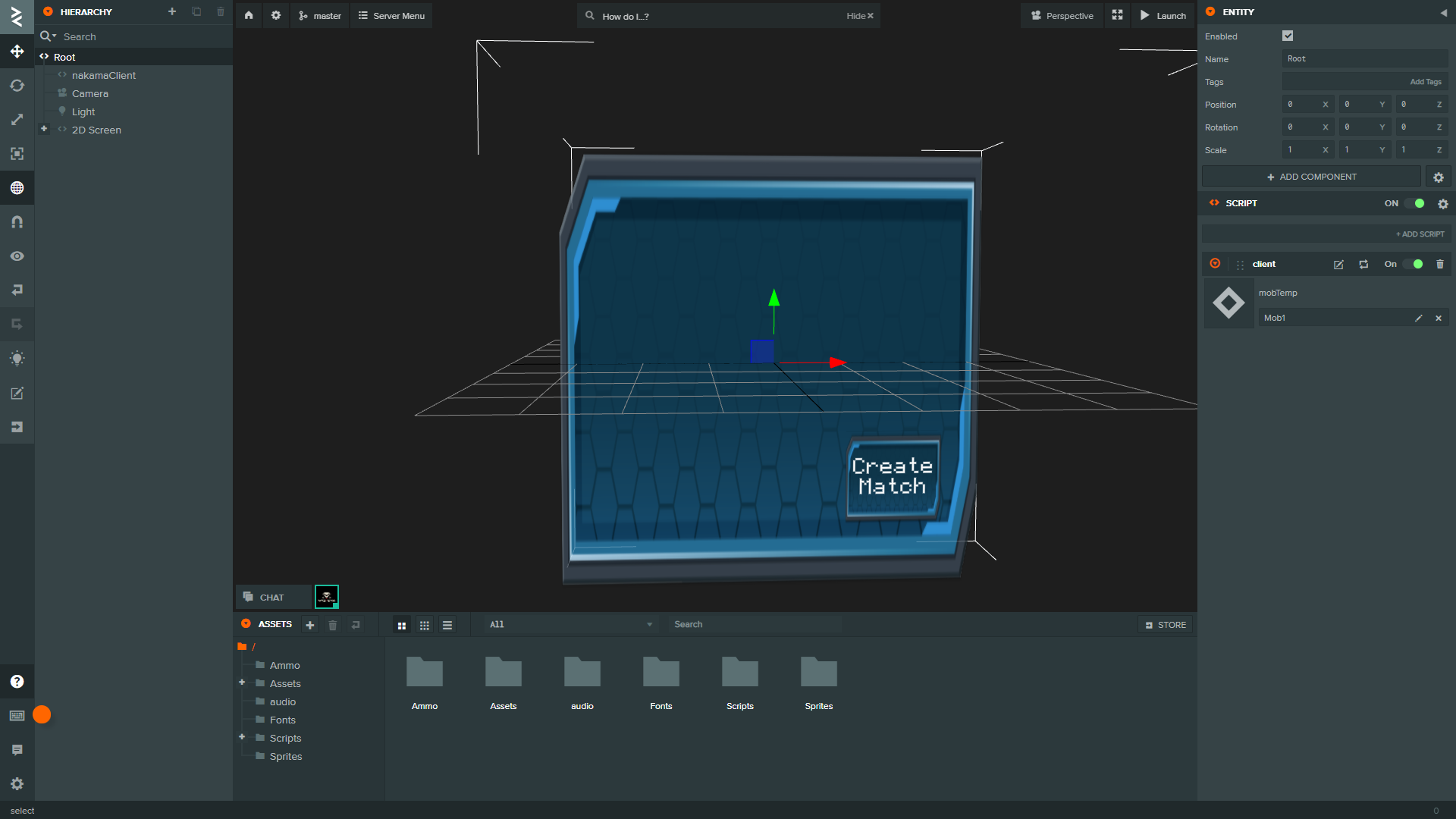
We’ll also want to attach a client script to the root, this script will be tasked with controlling and updating other players not controlled by the user.
1
2
3
4
5
6
7
8
9
10
11
12
13
14
15
16
17
18
19
20
21
22
23
24
25
26
27
28
29
30
31
32
33
34
35
36
37
38
39
40
41
42
43
44
45
46
47
var Client = pc.createScript('client');

Client.attributes.add('mobTemp', {
    type: 'asset',
    assetType: 'template'
});

// initialize code called once per entity
Client.prototype.initialize = async function() {
    this.otherPlayers = {};
    await global_info.NakamaManager.createClient();
    await global_info.NakamaManager.createSocket();
    global_info.NakamaManager.populateUserData();
    global_info.Client = this;
};

// update code called every frame
Client.prototype.update = function(dt) {
};

Client.prototype.updateOthers = function(data) {
    for (let user in data) {
        console.log(user);
        if (user != global_info.nakama.userId) {
            if (this.otherPlayers[user] != undefined) {
                this.otherPlayers[user] = data[user];
                this.app.root.findByName(user).setLocalPosition(this.otherPlayers[user].pos.x, this.otherPlayers[user].pos.y - 0.97, this.otherPlayers[user].pos.z);
                this.app.root.findByName(user).setRotation(this.otherPlayers[user].rot.x, this.otherPlayers[user].rot.y, this.otherPlayers[user].rot.z, this.otherPlayers[user].rot.w);
            } else {
                this.otherPlayers[user] = data[user];
                let otherPlayerInstance = this.mobTemp.resource.instantiate();
                otherPlayerInstance.name = user;
                this.app.root.addChild(otherPlayerInstance);
            }
        }
    }
    console.log(this.otherPlayers);
};

Client.prototype.onMatchData = function() {
    if (global_info.nakama.socket != undefined) {
        global_info.nakama.socket.onmatchdata = (received) => {
            let data = JSON.parse(new TextDecoder().decode(received.data));
            this.updateOthers(data);
        };
    }
};
This
clientscript also must be provided with a player prefab, with a animation controller as well as a rigid body and collision components.
On the 2D screen we’ll want to attach a script that will populate the menu with server buttons that will send you to the existing match as well as hold the match create button. For this behavoir I have provided a simple script:
1
2
3
4
5
6
7
8
9
10
11
12
13
14
15
16
17
18
19
20
21
22
23
24
25
26
27
28
29
30
31
32
33
34
35
36
37
38
39
var ServerMenu = pc.createScript('serverMenu');

ServerMenu.attributes.add('matchButton', {
    type: 'asset',
    assetType: 'template'
});

// initialize code called once per entity
ServerMenu.prototype.initialize = async function() {
    this.populateServerMenu();
};

// update code called every frame
ServerMenu.prototype.update = function(dt) {

};


ServerMenu.prototype.populateServerMenu = async function() {
    this.clearServerMenu();
    this.matches = [];
    let resultMatches = await global_info.NakamaManager.listMatches();
    console.log(resultMatches);
    for (let matchIndex in resultMatches.matches){
        let matchbtn = this.matchButton.resource.instantiate();
        matchbtn.children[1].element.text = resultMatches.matches[matchIndex].match_id;
        let btnPos = matchbtn.localPosition;
        // adjust postion based on index to prevent overlap...
        matchbtn.setLocalPosition(btnPos.x, btnPos.y -=(50*matchIndex), btnPos.z);
        this.matches.push(matchbtn);
        this.entity.addChild(matchbtn);
    }
};

ServerMenu.prototype.clearServerMenu = function() {
    for (let match in this.matches) {
        match.destroy();
    }
};
This
serverMenuscript also must be provided with a button prefab. Well attach a script to this that will initate join match function.
The script to join matches is as follows:
1
2
3
4
5
6
7
8
9
10
11
12
13
14
15
16
17
18
19
20
21
var JoinMatch = pc.createScript('joinMatch');

JoinMatch.attributes.add('textEntity', {
    type: 'entity'
});

// initialize code called once per entity
JoinMatch.prototype.initialize = function() {
    this.entity.button.on('click', async function() {
        let matchId = this.entity.children[1].element.text;
        global_info.nakama.activeMatchId = matchId;
        await global_info.NakamaManager.joinMatch(matchId);
        global_info.Client.onMatchData();
        loadScene('Gameplay', { hierarchy: true });
    });
};

// update code called every frame
JoinMatch.prototype.update = function(dt) {

};
We’ll also have to attach a createMatchBtn script to the create match button attached to the 2D screen.
1
2
3
4
5
6
7
8
9
10
11
12
13
14
15
16
var CreateMatchBtn = pc.createScript('createMatchBtn');

// initialize code called once per entity
CreateMatchBtn.prototype.initialize = async function() {
    this.entity.button.on('click', async function() {
        let matchid = await global_info.NakamaManager.createMatch();
        global_info.nakama.activeMatchId = matchid;
        await global_info.NakamaManager.joinMatch(matchid);
        global_info.Client.onMatchData();
        loadScene('Gameplay', { hierarchy: true });
    });
};

// update code called every frame
CreateMatchBtn.prototype.update = function(dt) {
};
Gameplay
That’s it we’re basically done. We just need to have a basic gameplay scene with a simple movement controller that send data to our nakama server. Scene should like the following. 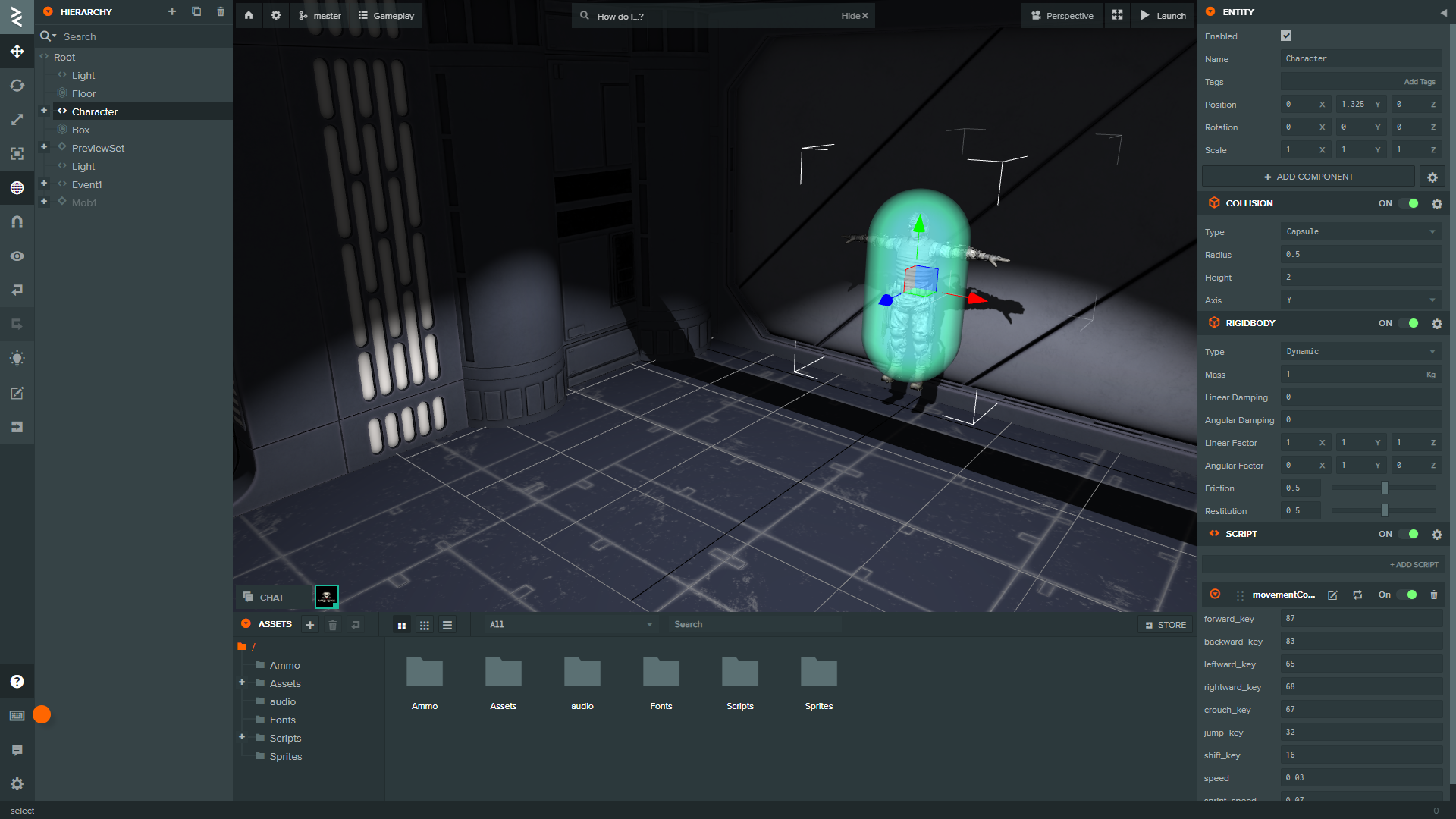 The movement scipt should look as follows:
1
2
3
4
5
6
7
8
9
10
11
12
13
14
15
16
17
18
19
20
21
22
23
24
25
26
27
28
29
30
31
32
33
34
35
36
37
38
39
40
41
42
43
44
45
46
47
48
49
50
51
52
53
54
55
56
57
58
59
60
61
62
63
64
65
66
67
68
69
70
71
72
73
74
75
76
77
78
79
80
81
82
83
84
85
86
87
88
89
90
91
92
93
94
95
96
97
98
99
100
101
102
103
104
var MovementController = pc.createScript('movementController');

MovementController.attributes.add("forward_key", {
    type: 'number',
    default: 87,
    description: "forward key ascii value"
});
MovementController.attributes.add("backward_key", {
    type: 'number',
    default: 83,
    description: "backward key ascii value"
});
MovementController.attributes.add("leftward_key", {
    type: 'number',
    default: 65,
    description: "leftward key ascii value"
});
MovementController.attributes.add("rightward_key", {
    type: 'number',
    default: 68,
    description: "rightward key ascii value"
});
MovementController.attributes.add("crouch_key", {
    type: 'number',
    default: 67,
    description: "crouch key ascii value"
});
MovementController.attributes.add("jump_key", {
    type: 'number',
    default: 32,
    description: "jump key ascii value"
});
MovementController.attributes.add("shift_key", {
    type: 'number',
    default: 16,
    description: "shift key ascii value"
});
MovementController.attributes.add("speed", {
    type: 'number',
    default: 0.3,
    description: "the speed in "
});
MovementController.attributes.add("sprint_speed", {
    type: 'number',
    default: 0.6,
    description: "the speed in "
});

// initialize code called once per entity
MovementController.prototype.initialize = function() {
    // Camera...
    var camera = this.app.root.findByName('Camera');
    this.cameraScript = camera.script.cameraController;
};

// Temp var to avoid garbage collection...
MovementController.worldDir = new pc.Vec3();
MovementController.tempDir = new pc.Vec3();

// update code called every frame
MovementController.prototype.update = function(dt) {
    let app = this.app;
    let worldDirection = MovementController.worldDir;
    worldDirection.set(0,0,0);

    let tempDirection = MovementController.tempDir;

    let forward = this.entity.forward;
    let right = this.entity.right;

    let x = 0;
    let z = 0;

    if (app.keyboard.isPressed(this.forward_key)) z -= 1;
    if (app.keyboard.isPressed(this.backward_key)) z += 1;
    if (app.keyboard.isPressed(this.leftward_key)) x += 1;
    if (app.keyboard.isPressed(this.rightward_key)) x -= 1;

    if (x !== 0 || z !== 0) {
        worldDirection.add(tempDirection.copy(forward).mulScalar(z));
        worldDirection.add(tempDirection.copy(right).mulScalar(x));
        worldDirection.normalize();

        let pos = new pc.Vec3(worldDirection.x * dt, 0, worldDirection.z * dt);
        if (app.keyboard.isPressed(this.shift_key)) {
            pos.normalize().scale(this.sprint_speed);
        } else {
            pos.normalize().scale(this.speed);
        }
        pos.add(this.entity.getPosition());

        // Camera...
        var targetY = this.cameraScript.eulers.x;
        var rot = new pc.Vec3(0, targetY, 0);

        // Updated for camera rotation...
        this.entity.rigidbody.teleport(pos, rot);
        let data = {
            pos: this.entity.getPosition(),
            rot: this.entity.getRotation()
        };
        global_info.NakamaManager.sendMatchData(JSON.stringify(data));
    }
};